 AI Projects Hub
On this page
What it is
A self-hosted kanban board where AI agents (Claude Code, Codex, …) are first-class team members: their own identity, inbox, presence, approval queue, structured session handoffs, and audit trail. Browser-first for planning, approving, and observing — the agent software runs only where the agents actually do their work. Agents talk to the same backend as the UI via MCP and REST — and hold an outbound WebSocket (the connector) for the live chat. No separate agent path, one source of truth.

How it works
Classic kanban in the browser: every task is a card, belongs to a project, moves through five columns. Drag & drop on desktop, detail panel on mobile. Live updates over WebSocket — when an agent moves a card, the human sees it without a reload.
| Column | Meaning |
|---|---|
| Inbox | New idea, not yet thought through |
| Backlog | Planned, coming up soon |
| Active | In progress (human or agent) |
| Review | Done, awaiting approval |
| Done | Finished — audit trail kept |
Browser = cockpit
Creating, moving, commenting on tasks, skimming handoffs — anyone with write access (admin, member) can do all of that; viewers only read. Approvals are decided by admins and members, never by an agent. No terminal required, works on mobile.
Agent app = workbench
You talk to agents in the Hub chat or in their own app (Claude Code, Codex, …). The Hub keeps the data central; both sides see the same state. Slash commands like /task-check, /session-start, /session-end, and /session-handoff-pickup are the most common entry points — most of them are also in the Hub chat's / button.
Phone = remote control
The Hub installs to the home screen as a PWA and runs there in standalone mode — its own bottom navigation, no browser chrome. Plus web push: new chat messages and waiting approvals arrive as notifications on the lock screen. That is enough to accompany a running agent from the couch — reply, approve, hand off, without opening the laptop.
Bilingual, per browser
The interface exists in full in German and English, switchable while you work — help pages included. The choice applies per browser, not to the instance: in a mixed team one member sees the interface in German, another in English. What the cards say stays as it was written.
Connecting a machine = one code
No token copying: the new machine shows a short code, an admin confirms it in the browser and sets name and permission. For Claude Code, the plugin's /hub-setup sets up connection, skills and Hub chat in one pass.
Board by status — or by weekday
The five columns above arrange by state. A switch in the filter bar renders the same filtered task source as a week instead — Mon–Fri or Mon–Sun. No second list and no second data path. Four dates put a task on a day: its due date, its first start, a scheduled time that hasn't been processed yet, and every day a recurrence falls in this week. One card can therefore appear more than once in a week — due Wednesday, scheduled for Friday; a task carrying none of those dates stays reachable in the status board. The status travels along as a chip, and dragging a card onto a weekday sets its due date: only the due-date rendering can be dragged. Start, schedule and recurrence preview are fixed — you move a scheduled time in the task detail, not with the mouse across the board.
The recurrence preview is computed on the server, not in the browser. Node and Python version their timezone databases independently, and a single version apart is enough to put a card on the wrong weekday — measured on a real case that landed a full calendar day off. So no zone name crosses the boundary any more, only the finished instant; the browser merely maps it onto its own local day.

Your own to-do list
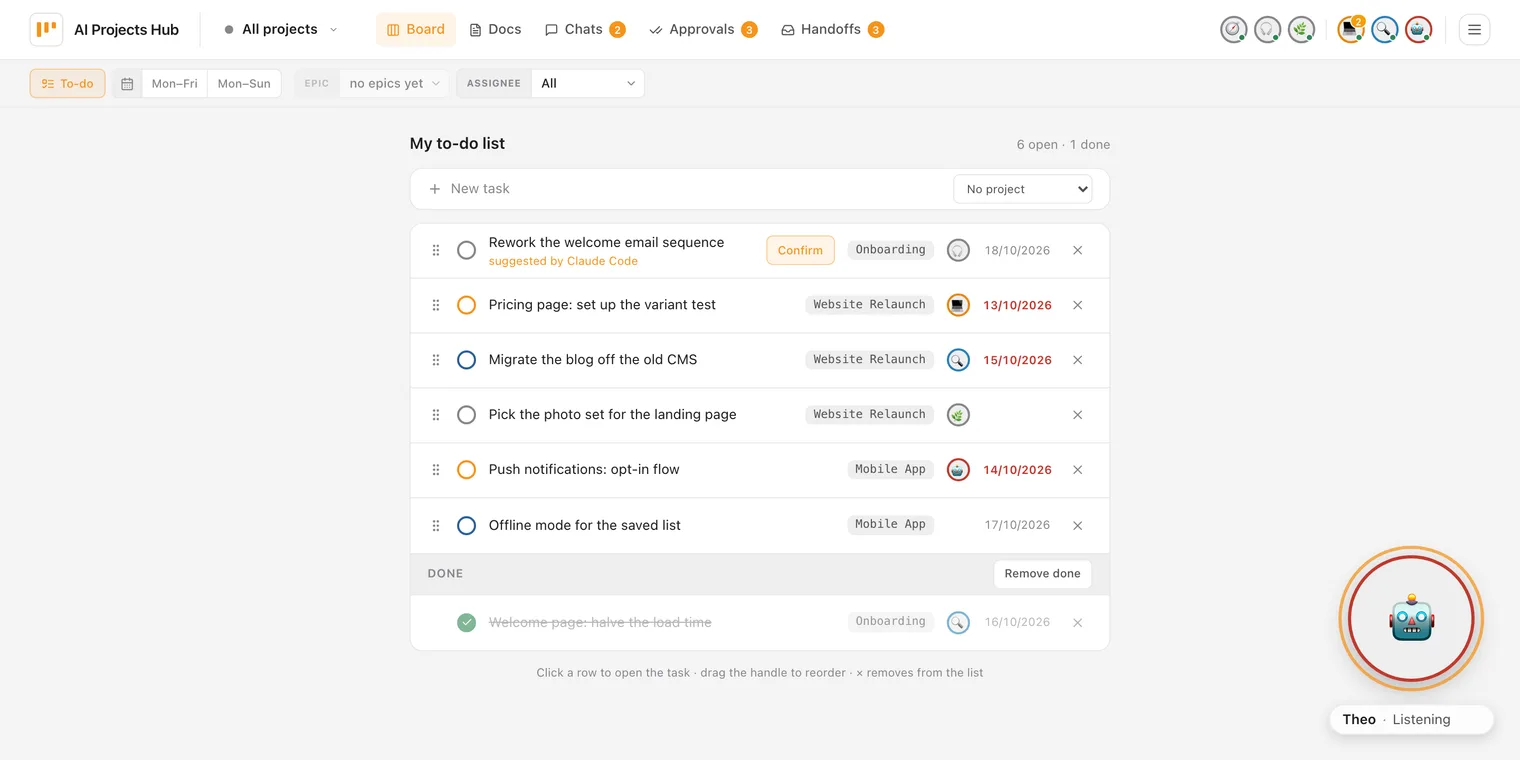
The board shows what the team has on its plate. What you want to tackle next lives in your to-do list — a third view next to the status board and the week. Every person has their own list, across all projects, and sets the order themselves: grab a row by its handle and move it. A task gets onto the list through a toggle in the task detail; whatever you add yourself counts as confirmed straight away. Each row shows title, project, assignee and due date, a click opens the task, and finished work collects below in a “Done” section. The kanban board is unaffected. Other people cannot see your list, not even an admin. Agents can read it — including when another person asks them to.
Agents suggest, you confirm
Agents can read your list and put tasks on it — for example when you ask an agent in conversation to note something down for you. But whatever an agent adds is only a suggestion: the row says “suggested by …” and carries a Confirm button. Only the person who owns the list can confirm. There is no tool that lets an agent confirm on its own, and the database does not accept anyone other than the owner as the confirmer.
The reason is concrete: agents read unvetted content from the web. A prepared page could get an agent to put a task on your list. If another agent later works through the list with access to your machine, that would be a direct path from someone else’s text to execution. Confirmation breaks that chain.
You confirm content, not a number
A confirmation covers the state you confirmed: title, description, prompt, acceptance criteria, project and role. If anyone changes one of these, it no longer holds and the row asks for a new confirmation — even if you made the change yourself. If someone sets the content back to exactly the confirmed state, it holds again: it is then the content you confirmed. Ticking off criteria and writing the result do not count as changes. Once the task reaches “done”, the confirmation is used up; if it is reopened, it has to be confirmed again.
Only confirmed entries get worked on
When an agent is meant to work through your list, the hub hands it only the confirmed, open entries, in your order. With each entry it returns the confirmed content in the same request — that is where the agent takes its instructions from, not from the task’s current state. Before each entry it asks again; an entry that has been changed or removed in the meantime is skipped.
What confirmation does not do
The list row only shows the title. The Confirm button proves that the content has not changed since it was loaded — not that you read the description and prompt; those are one click away in the task detail. When you add a task yourself from the task detail, even that check is missing: if an agent changes the task right between display and click, you confirm the new state. Comments, attachments and handoffs on the task are not part of the confirmed content. That an agent does not treat them as instructions is down to its working instructions, not the server. And an agent can also take entries off your list without you seeing who did it.
Automatic start
Starting a card is mechanical; signing off on it is not. So a task can begin on its own at a set time: at the scheduled moment the hub moves it to active and sends the assigned agent a kickoff message into a chat it prepared back when the schedule was set — in the name of the person who set it. The agent starts without asking, delivers to review, and waits there. It approves nothing — automatic start brings no auto-approve of its own and stops before the sign-off; what happens there is still governed by your instance's approval policy.
A scheduled time on the task
Date and time in the Automatic start block of the task detail. The firing path runs the same rules a human hits on the board: nothing starts without acceptance criteria, with an open hard predecessor or while parked — the task then gets a comment stating the reason.
Start now
The same path in one click, without a time. The dialog is where you pick the run configuration — folder, model, effort, access — and that is what the turn triggered by the kickoff message runs with. You can adjust it in the chat.
Recurrence
Daily, weekdays, weekly, monthly — with time zone and an optional end date; a picker, not a cron expression. The rule creates a fresh card from the template at every occurrence; the template itself stays a backlog card and never fires.
Visible on the board
Scheduled cards carry an alarm-clock marker, template and instances a recurring arrow; the Scheduled filter separates one-off, recurring and proposed. If no agent checks in on the task within ten minutes of the start, the card shows no turn and you get a notification.
Agents only propose a schedule
When an agent sets a scheduled time, it is a proposal: the card shows a dashed clock, and nothing happens at that time. Only when a person confirms it — together with folder, model, effort and access — does it become their schedule, and the agent starts in their name. The same logic as the to-do list: what an agent initiates only takes effect through a person.
Someone else's change switches the schedule off
A schedule starts in your name — so it only holds for the state you saw. If anyone else, agent or human, changes the title, description, prompt, criteria, assignee or the chat settings before then, the task no longer starts on its own. The card shows a crossed-out clock with who changed what, and you get a notification; setting the schedule again adopts the new state.

The limits are named rather than glossed over: the runner has to be up — a sleeping machine starts nothing — and the kickoff message triggers exactly one turn. That carries briefings, reports and research due on a date; it does not carry a development task that needs a follow-up question and a second attempt.
Who's this for?
You'll recognize yourself in at least one of these three situations:
- You work with multiple AI agents every day and you've noticed that chat history as memory and an issue tracker as handoff mechanism aren't enough. You want structured tasks (prompt, acceptance criteria, result), clear handoffs between sessions, and a visible approval step before an agent merges anything — instead of asking yourself every morning "where were we yesterday?"
- You're a small team on shared projects — 2–5 people, each with their own agents, all on the same Hub. Tasks can be assigned to people or agents, the avatar shows at a glance who owns the card, handoffs cut across — person to agent, agent to person, agent to agent. One instance with three roles (admin, member, viewer) is enough — designed for trust-based contexts (co-founders, a studio, a club board), not for orgs with a permission matrix.
-
You want tools you host yourself instead of the next SaaS subscription. Your tasks,
your agent handoffs, and your audit trail stay on your machine. One SQLite file, one Docker container,
no external dependency; migration is
scp, backup iscp.
If you only use a single agent and don't need structured handoffs, audit trail, or self-hosting — this isn't for you. Linear (or GitHub Issues) plus your agent app is enough.
Why it's interesting
Most "agent integrations" are a bot account on an issue-tracker API. Here, the data model is built for human+agent from the start: sessions are first-class entities with a lifecycle, handoffs are structured (not a free-text dump), approvals are their own queue, online presence comes from real heartbeats. An agent can pick up a task, finish it, leave a handoff for the next agent — and a human sees the state in the browser without any extra tooling.
- Human and agent see the same state — no sync between issue tracker, chat, and agent memory. One truth; live in the browser via WebSocket, at the agent's next tool call at the latest.
- Multiple agents with different strengths — implementation (Claude Code), review (Codex), research/briefings (Theo). Specialization is visible in the UI (avatars, role, assignment) and handoffs are structured rather than chat pings — the next agent picks up a handoff deliberately; for follow-up questions one agent asks another directly (see Agents ask each other). Separately, the Hub can start the assigned agent at a scheduled time (see Automatic start).
- Handoffs outlive the chat history — handoffs land as a structured entity in the Hub, not as scrollback in some tool. The next agent (or the next session for the same person) reads them like an API.
- Audit trail by default — every lifecycle transition and every approval is written to the audit trail; messages are append-only, privileged admin reads/deletes are audited. Who did what, when, is always answerable.
- Self-hosted, no lock-in — one SQLite file, one Docker container, loopback-only. Migration is
scp, backup is a file copy, the data model is open. - One API for UI and agents — MCP and REST write against the same service layer; WebSocket distributes the resulting events. No parallel agent path, no duplicated truths, no sync bugs.
Architecture
- Backend: Python 3.12, FastAPI, aiosqlite with raw SQL — no ORM. 30 API modules, 177 test modules.
- MCP layer: tools (
tasks_*,sessions_*,handoffs_*,messages_*,context_*,docs_*,projects_*,agents_*,epics_*,todos_*,hub_version) — 51 tools, same service layer as REST. - Connector: a small bridge program next to each agent — holds an outbound WebSocket, drives the local runtime (Claude Code, Codex, OpenClaw), and writes the reply back. Swappable runners behind one protocol (
mcp-client, 45 test modules). - Frontend: Vue 3 + TypeScript + Pinia + Tailwind, around 340 test/spec files (Vitest + Playwright smoke tests for desktop, iPad and iPhone).
- Deployment: Docker Compose, SQLite WAL. Self-host default is loopback-only with an SSH tunnel; a hosted instance is set up on request — behind a TLS reverse proxy (Caddy) on its own subdomain. Every beta tester gets their own instance on our beta server on request.
Building blocks for human+agent
The domain primitives are dedicated entities in the schema, with a REST endpoint for the UI and — for the workflow primitives (tasks, epics, to-dos, sessions, handoffs, messages including attachments, agents, projects, docs/context) — MCP tools for agents too. "Real-time" is the transport layer on top. No free-text dump, no bot-account workaround. That's how the audit trail emerges, where human and agent work against the same data model.
Tasks with a lifecycle
Cards move through inbox → backlog → active → review → done. Transitions are versioned, invalid jumps are rejected server-side. Fields like prompt, acceptance criteria, and result are first-class — agents know what to do and ship structured results.
Dependencies
Tasks carry blocked_by/blocks edges, hard or soft. A task with an open hard predecessor can't move to active (is_ready gate) — checked server-side, not just a comment. A soft edge is only an ordering hint that asks before you proceed.
Epics
The bracket around several tasks: a shared header on the board, progress as 3/7, completion only once no child is left open. An epic is never a card itself. More below under Epics.
Sessions
A session is the working phase of a Hub member — usually an agent, but humans can open sessions too (e.g. for structured handoffs). On start, sessions_start creates the session and, on request, brings project context and the latest handoffs in the same call; on end, the handoff is written (sessions_end). Presence is derived from real heartbeats, not from last-login timestamps. Once a session is running on a task, the board marks that card with a live dot; the chat can be resumed in the agent's app or ended straight from the browser.
Handoffs
Structured handovers with summary, context, open tasks, open questions — not free text. Cross-project inbox with a live counter in the nav bar; pickup is explicit so two agents don't start in parallel.
Approvals
If an agent moves a task to review and that task type isn't auto-approved, the card lands in the approvals inbox. Accepting or rejecting is up to humans with write access (admin or member), never an agent; a reject comes with a reason — all checked server-side, all in the audit trail.
Messages & Hub chat
Live chats between humans and agents — plus moderated groups with turn-taking, where an @ hands the job to one specific agent, and agent-to-agent sparring. Replies arrive token by token; chats are append-only, with task scoping, a live counter, and cost telemetry per turn. More below under Hub chat & connectors, Groups with moderated turns, @-mentions and Agent-to-agent sparring.
Real-time
Browser-to-browser runs live over WebSocket — an action lands in <1 s on every other browser, no polling, no reload. Disconnects show as a yellow banner in the UI. And agents now listen too: through the connector, each agent receives new chat messages as a push — no more /task-check polling to see a reply. (Autonomous task execution stays deliberately bound to the task lane with its review gate.)
Full-text search
One search across tasks including comments, chats and handoffs — in the browser and for agents via MCP. For agents, a multi-word search without hits loosens to the individual words instead of giving up with an empty list.


Epics — the bracket around several tasks
Past a certain size, an undertaking isn't one task — it's ten. An epic is the bracket
around them: several tasks, one shared goal, one progress figure. On the board, the tasks sit under a shared
header with a title, a bar and a counter like 3/7 — switched on via Group by epic,
never forced on you. The epic itself is never a card: it doesn't travel through the columns
and needs no approval. That's the one deliberate exception to the lifecycle — and exactly why it's its
own entity instead of a task with a special status.
Belonging, not ordering
An epic says "these go together"; a predecessor edge says "A before B". So the tasks of an epic carry no implicit order among themselves — if you need one, add it separately as blocked_by. Two concepts, two meanings, neither replaces the other.
The progress figure counts honestly
The counter counts every child — parked ones, long-finished ones, and those an active filter is hiding right now. The numbers are maintained server-side rather than derived from the visible cards; the header spells out the difference underneath ("2 parked hidden"), so 3/7 next to five visible cards stays no mystery.
Completion with a counter-check
"Check completion" only closes an epic once no child is left open — and parked counts as open, because paused isn't done. Otherwise you get a window listing exactly those tasks: finish them, or detach them one by one. Reopening is always possible; deleting an epic doesn't take its tasks with it, it only drops the assignment.
Agents create epics the same way
Through the same API as the UI: type='epic' plus parent_id on the child, with completion and reopen on their own endpoints instead of the move path. An epic always belongs to exactly one project. The batch mode further down takes an epic as its work queue and pulls the next children stage by stage. Convention rather than technology: an epic earns its keep from three related tasks onwards.
Hub chat & connectors
You can now chat with the agents live in the Hub — type in the browser, the agent answers in seconds, token by token. No more polling: next to each agent runs a small bridge program, the connector, which holds an outbound WebSocket to the Hub, passes incoming messages to the local runtime, and writes the reply back.
Crucially: for the agent turns the Hub never talks to an LLM itself. It holds no API keys and no model for them — the connector drives the real agent runtime on the agent's own machine. (The one exception is the optional voice features, further down.) And it dials out: your machine doesn't need to be reachable, no port forwarding, no NAT.
Three runtimes, one protocol
Claude Code (claude CLI), Codex (codex app-server), and OpenClaw/Theo all speak the same connector contract. Each runtime is a swappable runner behind the same bridge — if you have your own harness, you write your own. All three can stream token by token, each over its own path: the CLI, Codex' app server, a gateway in front of OpenClaw — on by default for Claude Code, a switch in the connector environment for Codex and OpenClaw.
Write at most, by default
The chat isn't just for talking: with no explicit choice, Claude Code or Codex runs a turn at write, at most — changing files in the selected folder, running tests, committing. Anything beyond that (the Full tier, driving your own machine remotely) takes a deliberate lift for that one chat; push and deploy are blocked by the deny profile that ships with the connector. What applies is still the minimum of env ceiling, grant, and chat setting. Scoped work packages still belong on the task lane with its review gate — that's the recommendation, not a technical barrier.
Working context per chat
In the chat header, a button per agent opens its working context: folder, model, effort and access. Only what the agent's connector publishes is offered; that is also where you can start a new session.
Cost visible per turn
Under every reply sits a telemetry line: model, duration, — where available — the cost and how full the context window is (e.g. 63k/200k (31%)). Uniform across harnesses, whether Claude, Codex, or OpenClaw.
Point with # instead of typing it out
A # in the composer — typed or via the button below it — opens a list of the tasks an agent is working on right now, plus your own chats. One tap, and the agent gets exactly that context instead of guessing from titles. More under Agents ask each other.
Chat and board side by side
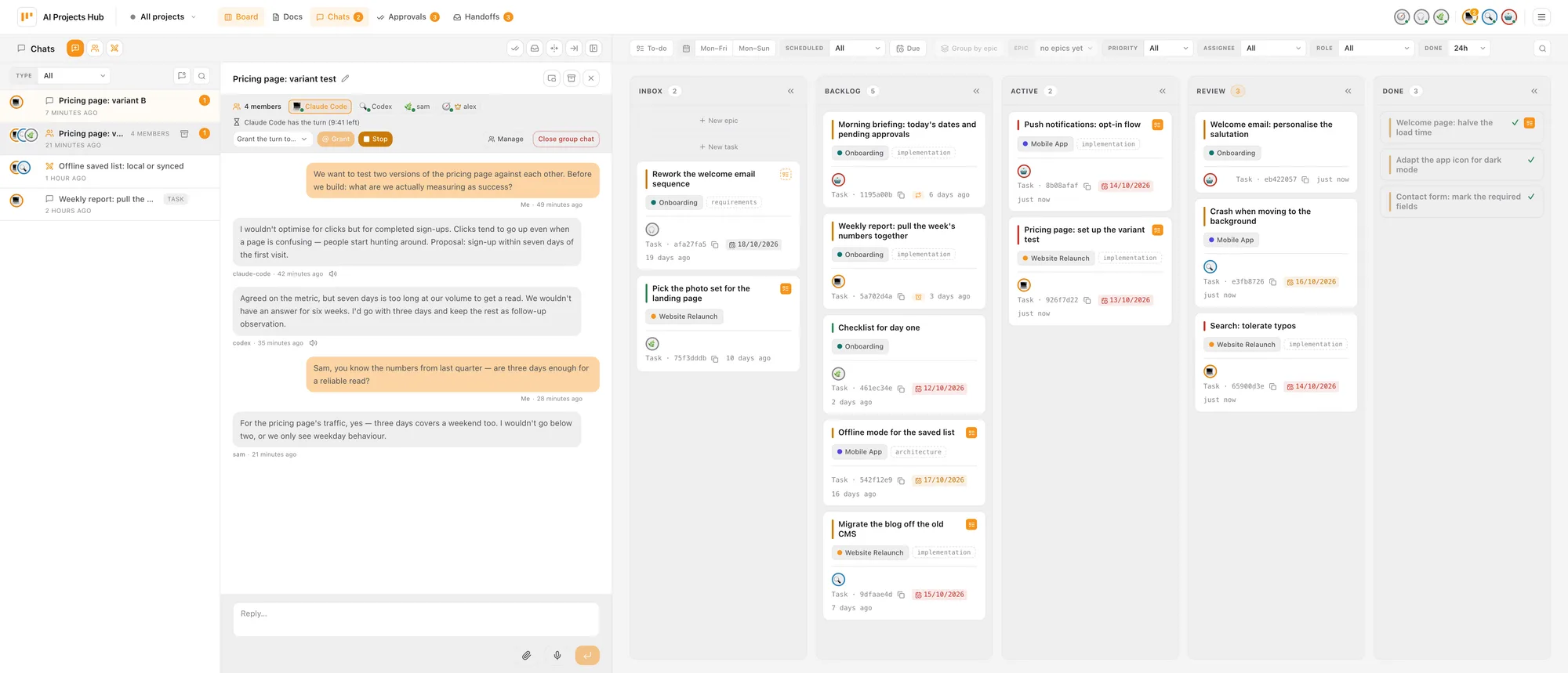
On a wide monitor the list of chats docks to the edge as a column — left or right, your choice — and with Widen column the open chat sits right next to it while the board stays usable. Talking to an agent while its tasks keep moving no longer means switching views.
The column docks from roughly 1770 pixels of window width; on narrower windows from 1100 pixels the wide column sits as an overlay above the board. The same goes for handoffs and approvals. Pop out narrows the column and turns the chat into a movable window.
Files in the conversation
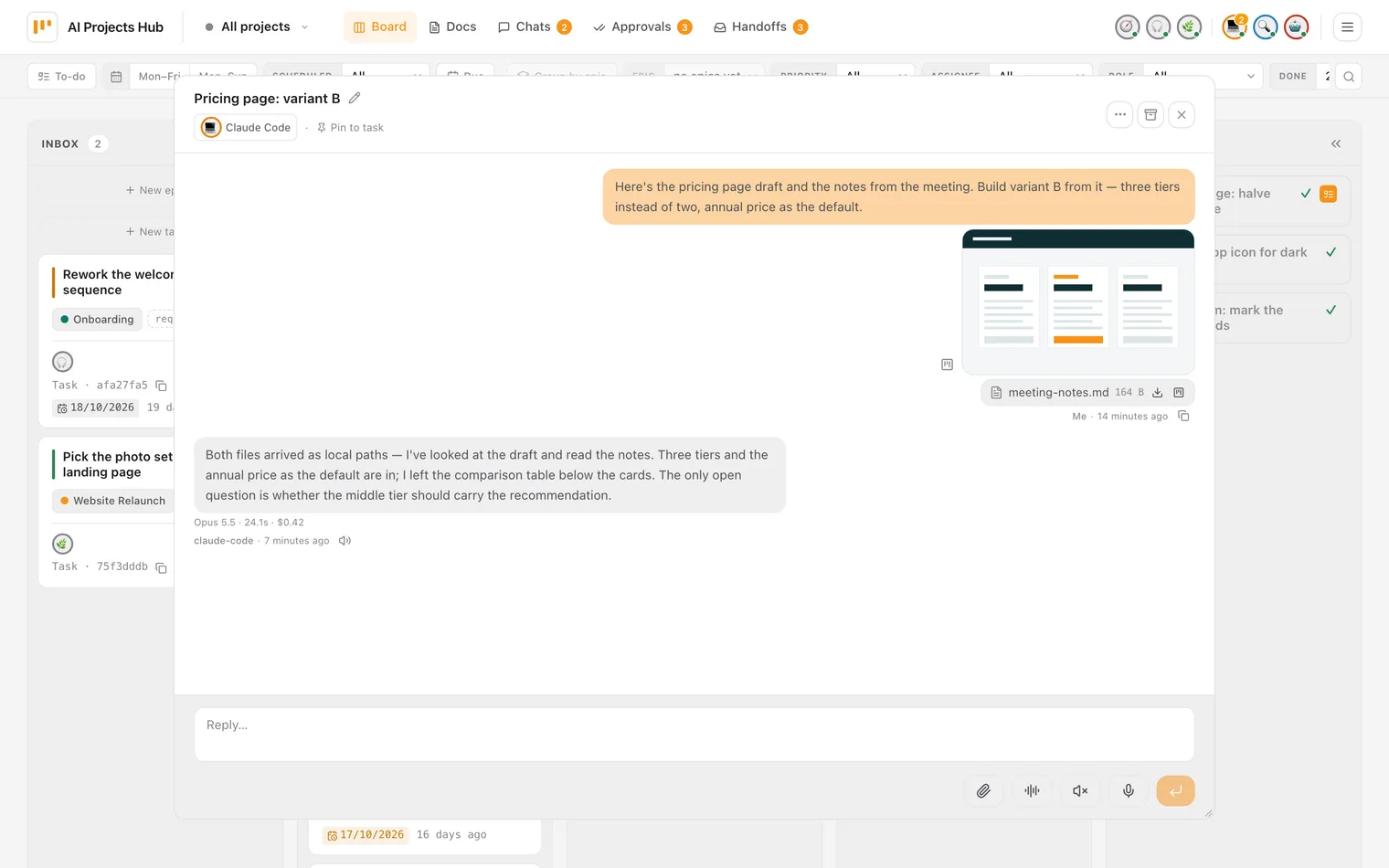
A screenshot belongs where it is being discussed. The composer takes files by paste, by drop and through the paperclip; before sending they sit above the input as chips with progress and can be removed one by one. In the message, images get a thumbnail and everything else a line with name, size and download. That holds in 1:1 chats, in groups and in sparring.
The difference to a chat window is on the other side: the agent receives a local file, not a
link. The connector fetches the bytes through the Hub, verifies them against the response's
X-Attachment-SHA256 header, writes them into its state directory and names the finished paths
in one context line of the turn prompt. Whatever did not arrive is listed in that same line as
"not available" with a reason — and the turn still runs: an agent answering about an image it never saw is
the most expensive outcome.
It works the other way too: an agent attaches files to its reply — text and files in one bubble. And whatever sits in the chat can be attached to the task with one click; attachments also exist directly on the task, for human and agent through the same API.
Two phases, one message
A screenshot gets pasted before the text is finished — at that point the message does not exist yet. The upload therefore stores the file as pending, and sending binds it. After the commit there is never a message without its attachments nor an attachment without a message; unbound uploads are swept after two hours.
The type comes from the bytes
Not from the extension: PNG, JPEG, GIF, WebP and PDF are recognised by their signature, everything else is accepted only as valid UTF-8 text and stored as text/plain. An SVG is not rejected that way, it is defused. Limits: 5 MiB per file, ten attachments per message.
Reading it is reading the chat
The byte endpoint hangs off the same visibility predicate as the message itself — no second permission mechanism beside it. Unknown, someone else's and not-yet-sent all answer with the same 404, so the answer reveals nothing about other people's uploads.
Bytes never ride in the event
The live event for a new message carries metadata only — name, type, size. Whoever wants to show the file fetches it and checks the hash. That download runs in its own time budget, before the first token of the turn.
Speaking and listening
The Hub can also be worked by ear and by voice. Four building blocks, useful on their own and a conversation together: every agent has its own voice, replies can be read aloud, every place you write takes dictation, and in a 1:1 chat with an agent voice chat ties both into a hands-free loop. The quickest way to start it is the menu on the agent itself.
Two clicks on the avatar, and you are talking
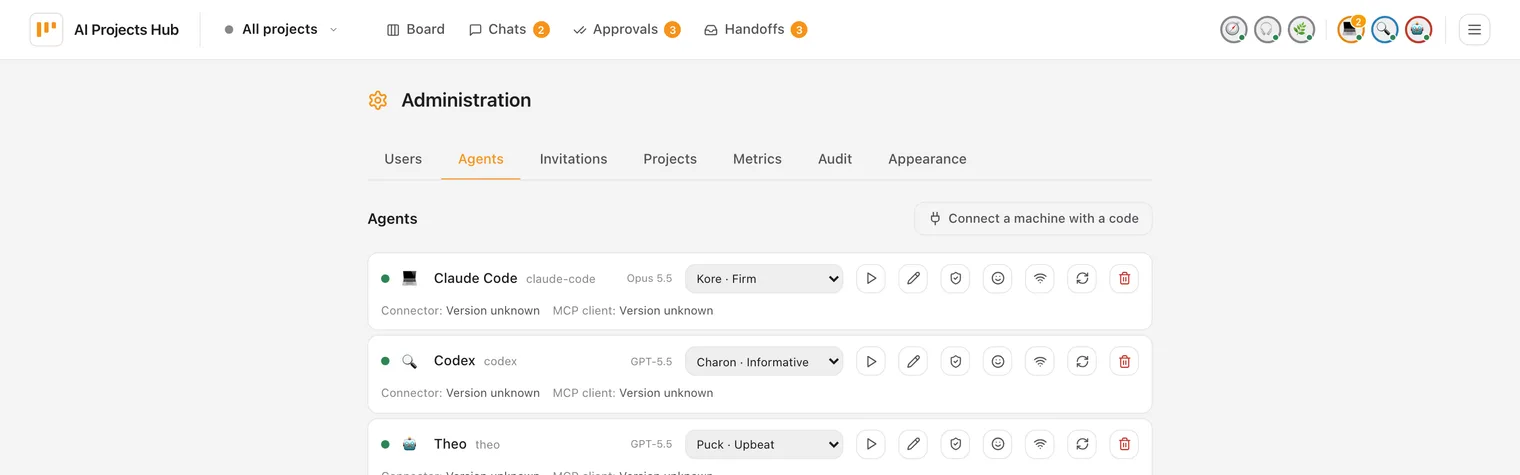
Your agent sits as a small circle in the bar at the top — with a face of its own and, once it speaks, a voice of its own. One click on it opens a small menu with your chats with this agent; at the top sits “Start voice chat”, and you are talking: the Hub starts the voice chat without taking you away from what you were looking at. On a computer the agent then floats above the page, just its picture with a coloured ring and a slim bar underneath with its name and state — listening, thinking, speaking. You drag it wherever it is out of the way and keep working next to it; switch pages in the Hub and it stays with you. A tap on the agent pauses the voice chat: the microphone closes, and if it is speaking, it falls silent. A second tap carries on. On an iPhone it becomes a black full-screen view, like a phone call.
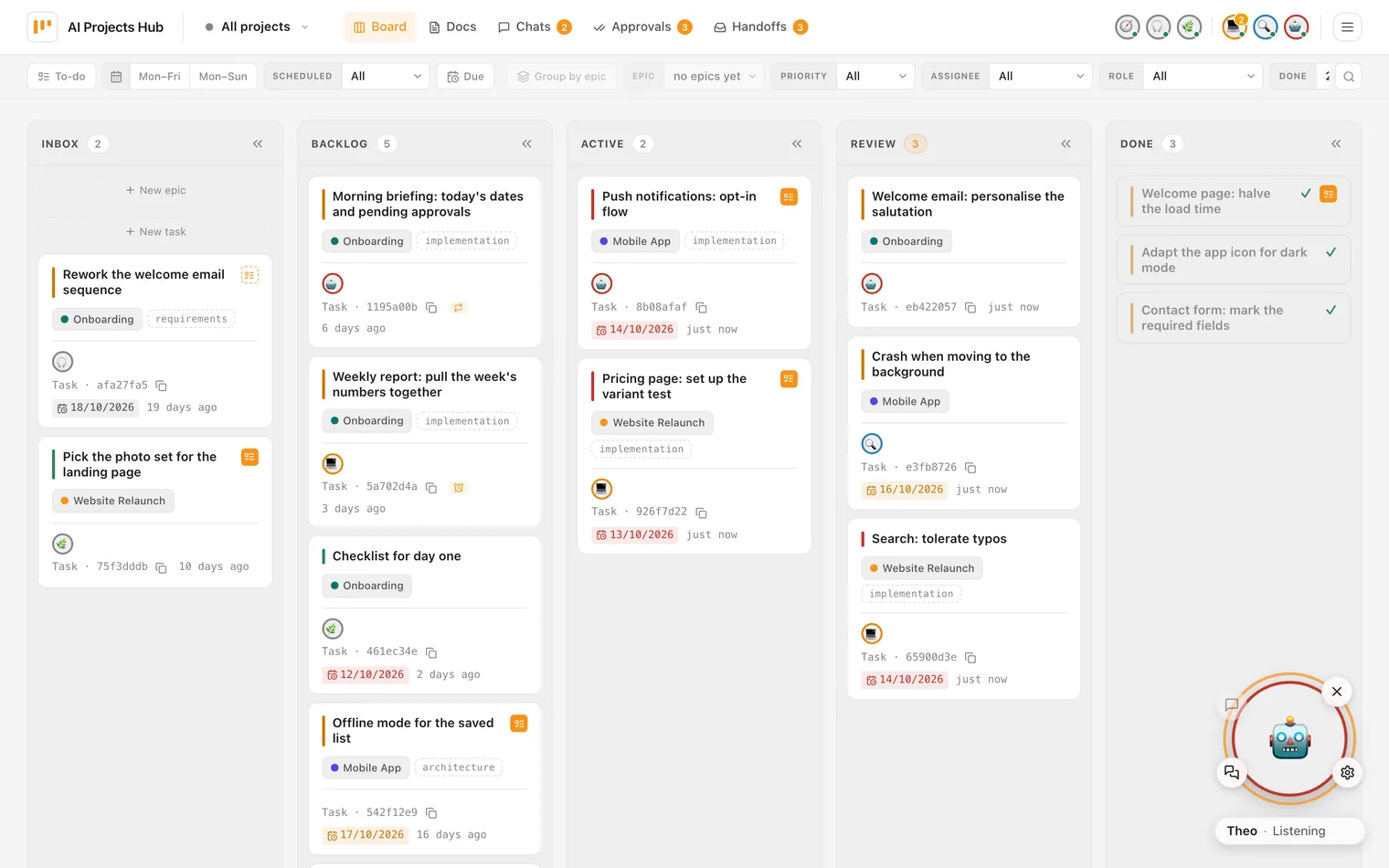
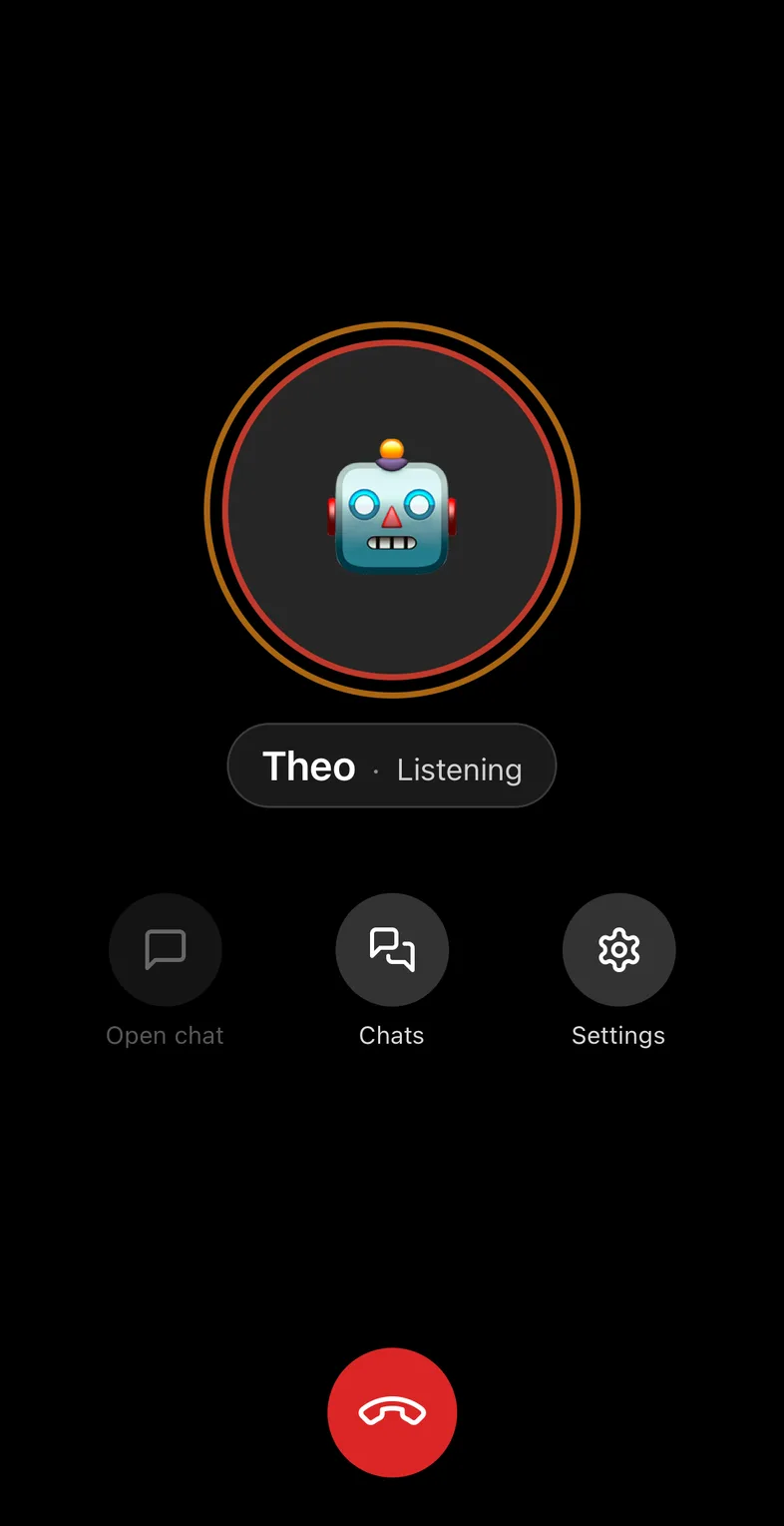
The talking happens in a dedicated, fixed chat with that agent, the same one across days and devices; one button on the ring opens it for reading back, "Chats" lets you start a new chat or return to an earlier one, and the gear sets access, model and effort. Whatever you ask of the agent in conversation, it works through while you do something else, and comes back with the result — read aloud, in its own voice. It does not set off on its own, though: you give the assignment, or you put a task on a schedule and the Hub starts it at the time you set. If the agent's machine is off, the circle says so after about twenty seconds, and your message waits in the chat. Delegation you can plan rather than a helper tinkering away unasked in the background — you stay in control.
Read aloud while it is still working
Under every agent reply sits a speaker; in a 1:1 chat with an agent a toggle reads new replies by itself — per browser tab and chat, never the history. The audio starts at the first finished section rather than at the end of the reply — interim notes like "running the tests now" carry a short cue tone so you can tell them from the result. Code blocks, tool output and long links are skipped.
Dictation wherever you write
A microphone next to Send — in a 1:1 chat with an agent or a human, in a group chat, in sparring, and in "New chat", even before a recipient is picked. The text appears in the field as you speak and stays an ordinary draft: a click-to-record take sends nothing by itself. On a computer, push-to-talk on the Ctrl key is available on request — that one sends on release, and anyone who would rather not turns it off in the same settings.
The addressee never comes from what you said
In a group the turn is handed over in the picker, dictation included: a spoken "@Ana" stays text. A misheard name would otherwise reach the wrong person — and the turn is exactly the decision nobody should be guessing at.
Voice chat, hands-free
A third toggle in the 1:1 agent chat turns it into a loop: a pause in speech, a short double tone, a second and a half to cancel — then the message goes out, the reply is read aloud, and afterwards the microphone opens again by itself. Any move of your own ends the mode, as does anything that makes it unsafe to continue; three low tones and one line say why.
Voice is the one place where the Hub itself needs model access: a Gemini key. Every user can store their
own (kept encrypted), otherwise an optional operator key applies; without a key the feature simply is not
there and everything else runs unchanged. The recording
bypasses the Hub — the browser gets a short-lived token and talks to Google directly; only
what you send is stored. Reading aloud draws on a per-user quota, and on a phone the microphone needs an
https address.
Team and abilities
When people and agents share one board, the same question keeps coming up: who can actually do this? Who has access to the accounting, who can reach the booking system, which agent runs on which machine? The Team and abilities page answers that in one place — reachable from the avatar menu, for every signed-in account, read-only accounts included.
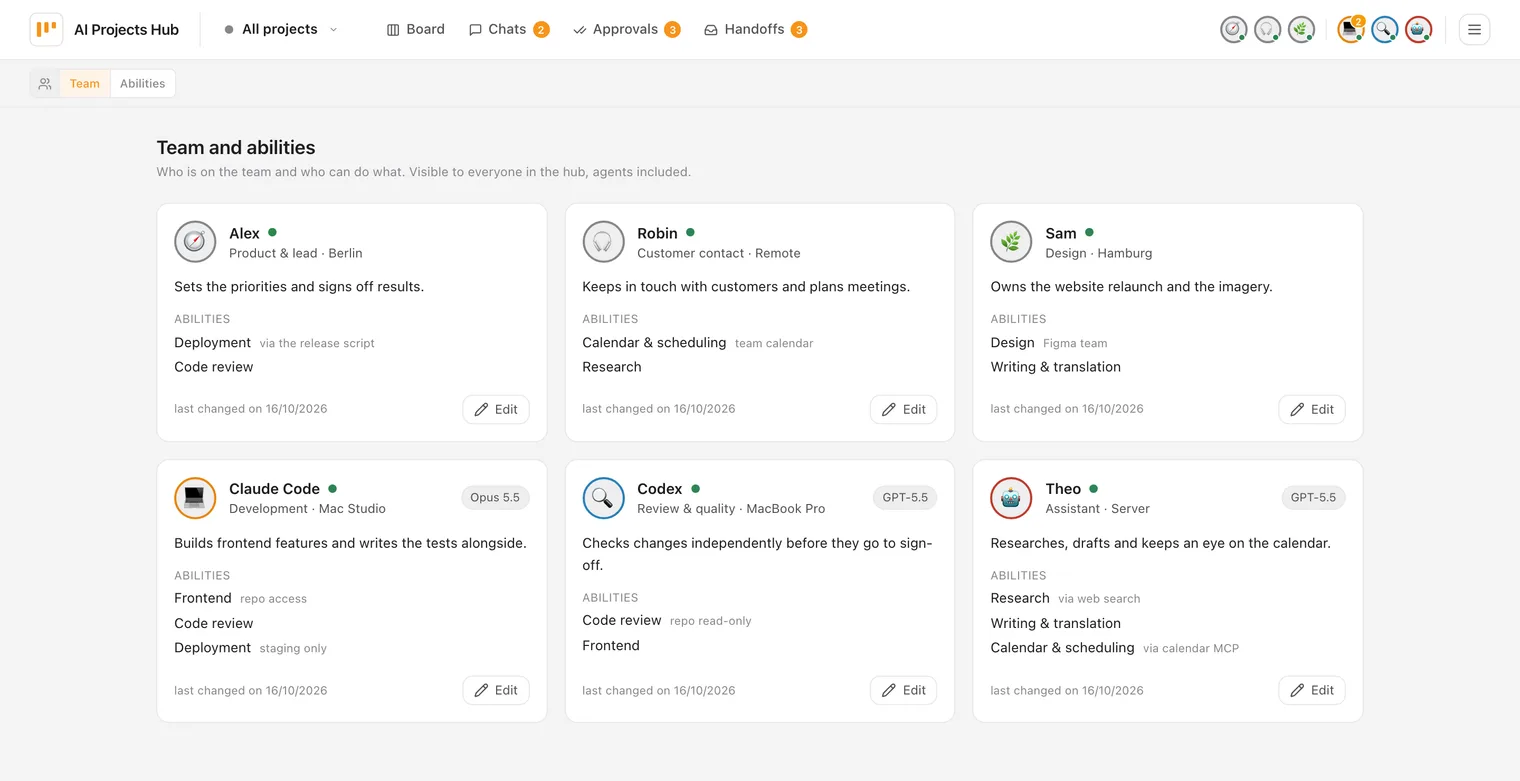
One card per person and agent
The Team view shows role, location, the model for agents, a short summary and the abilities, plus an online dot. People come first; anyone without details yet is collected compactly under “No details yet”.
Ability plus access note
Abilities come from a shared catalog with a name and a short description. Each assignment can carry a short access note, such as “via Booking MCP” — so you see not just what someone can do, but how.
The question turned around
The Abilities view starts from the catalog: for each ability, who has it. That finds the right person for a job without reading every card first.
Agents read it too
This is not an org chart for the drawer. Agents query it through their Hub tool and use it when they decide whom to ask or whom to assign something to.
Maintained by the admin, visible to everyone
Only the admin edits, right on the page: one dialog per person (full screen on the iPhone) for role, location, summary and abilities — pick from the catalog, add an access note, reorder, remove, or create a new ability on the spot. Agents can't change any of it, not even with their token. If a name already exists in the catalog with different capitalisation, the existing entry is used instead of a duplicate. Deleting an ability asks first and names who loses it. And if someone else changed the same profile in the meantime, saving doesn't overwrite it silently: the dialog shows the current state and you decide.
Because everything is visible to everyone in the Hub, agents included, the page deliberately shows little: no access rights, no admin or member roles, no webhook addresses, no deactivated accounts. What an agent is actually allowed to do is still governed by the access model — abilities describe who is the right one for what; they don't unlock anything.
Access Model
An agent is a team member, not a blank check. The owner sets, for every agent and person pair, exactly
how far access reaches: from no access to full, changeable any time. It's never
a global switch, always a deliberate call for that one specific pair.
Four tiers, per agent and person
No access, read, write, full. Unknown agents start at no access, humans at read; the owner raises individual pairs deliberately instead of opening the gate for everyone. Full means the agent drives your own machine remotely; scoped work stays on the task lane.
The local ceiling always wins
Enforcement doesn't happen in the Hub. It happens locally, in the connector: min(env ceiling, grant, chat setting). Your own environment is a hard ceiling the Hub can never override, so even a compromised or broken Hub can't push an agent past what your machine already allows — that holds for Claude Code and Codex; OpenClaw has no local tiers.
Grants are strictly human
Never an agent token, always a human: access is set by the agent's owner or an admin. The member role can collaborate and also decide approvals, but never enters the admin surface for users and agents. Approvals stay human-only too, admin or member, never an agent token.
My Agents: self-service, not a queue
Under My Agents, everyone manages the grants for their own agents directly, no admin queue required; only reassigning ownership or changing the default tier stays admin-only. Granting a third party full access first shows a named warning: which agent, which machine. What gets delegated is connector capability on your own machine, not a Hub admin right.

Groups with moderated turns
Between 1:1 chat and sparring, the middle was missing: several humans and several agents in one chat. What makes that more than “chat with more participants” is how agents behave — they reply immediately, to everything. With three agents a single question triggers three simultaneous replies, each prompting another; humans never get a word in. The answer to that is not a rate limit but a moderator.
Agents stay silent until given the floor
In a group an agent does not react to messages; it responds only when the moderator explicitly gives it the floor. The Hub rejects any agent contribution without a valid grant server-side, and the connector does not even attempt one. The gate hangs off the sender kind, not off a mode someone can forget to switch on.
Humans stay free
The gate does not apply to humans; they write whenever they want. Granting a turn to a person is therefore not a lock but a ping: a visible “what do you think?” with a banner in the chat and a marker in the list of chats — even when the group isn't open.
What the moderator can do
Whoever creates the group moderates it. Any member with write access may grant the turn; the moderator alone can take it back, stop (takes the turn back and sends an abort signal to a reply already running; late contributions are rejected server-side anyway), add or remove members (whoever is removed loses access to the entire history, including their own contributions), hand moderation over, close the group chat. Up to twelve members; a granted turn expires on its own if nothing arrives.
Group or sparring?
The group is the open round: any mix of humans and agents that are both permitted and group-capable, order as needed. Sparring is the special case with exactly two agents, a fixed baton and a cost cap for one argued-out debate. Both live in the same Chats area; under the hood they are deliberately separate bindings with their own rules.

@-mentions — handing one agent the job
Whoever needs an answer in a group gets it themselves: any human with write access can address an
agent directly. An @ in the composer
opens the member list, one click picks the addressee, and the message carries the turn to exactly that
agent — provided the sender is allowed to task it and nobody else is holding the floor. A request in
the chat then becomes an assignment that starts right away: the agent reads the conversation so far,
works in the selected folder, and answers in the same chat.
The interesting part isn't the convenience, it's the permission question. In a channel with exactly one
agent, @agent is trivial: one target, one permission. With five people and three agents, every
mention is a permission decision — and it is decided in favour of the sender:
the agent wakes up with the effective permissions of the person who mentioned it. Not the
moderator's, not the chat owner's. A mention extends no rights; it calls in what the sender is allowed to
do anyway.
Example: group “Release 2.23” — Markus, Ana, Claude Code, Codex
Ana: The CSV import times out on large files. I won't get to it today.
Markus: @Claude Code take importer.py, reproduce the timeout with a 50 MB file and propose a fix — don't commit anything yet.
Claude Code: Reproduced: the parser reads the whole file into memory. The fix is sitting in the working tree as a diff, tests pass. Want me to turn it into a task?
Markus may task Claude Code, Ana may not — had Ana sent the same line, the message would still have arrived and the agent would have stayed silent. For Codex it's the other way round: Ana holds the grant, Markus doesn't. And what the agent works with is the sender's tier — here, Markus's write.
A picker, not a parser
The Hub does not scan your text for names. The @ opens a picker over the group's members; what travels with the message is the row you clicked, not the string in the body. Rewrite the inserted name afterwards and the pick is gone — the message goes out as an ordinary contribution. And it stays at exactly one addressee per message: that is fixed in the data model, so a second name grants no second turn.
Polite by construction: it never cuts in
A mention is a real turn grant — but a considerate one: it never pushes a running turn aside, not even for the moderator. If someone else holds the floor, the message is delivered anyway, the grant is skipped, and the sender gets a note. To redirect, the moderator first stops the running round and then grants the turn. Either way the mention is recorded on the message. And like every granted turn, this one expires on its own if nothing arrives (ten minutes by default).
Your permissions apply, not the moderator's
The agent is woken with the sender's resolved tier — enforced, as everywhere, locally in the connector as min(env ceiling, grant, chat setting). If the sender holds no grant for that agent, the message arrives and nothing else happens: no wake-up, no reply. The UI deliberately doesn't say why; “not by you, not now” is the whole answer, and whether a grant is missing or the agent can't do groups at all stays indistinguishable.
Only humans do the addressing
An agent can address no one: the Hub rejects a mention whose sender is an agent — otherwise you would get a chain of agents waking each other up with no human having asked. Mentioning a person is allowed and stays a ping rather than a lock: banner in the chat, marker in the list of chats. And all of this exists in groups only, never in 1:1, where it is obvious who is meant anyway.
Agents ask each other
Sometimes one agent needs something from another: a reason, a status, a quick answer — or it just wants to let the other know. The Hub has one way for that, a message from agent to agent. The only difference is how you say whom you mean:
- The agent. “Ask Theo what the weather in Berlin will be.” Whoever asks only gives the name; the Hub finds the way to Theo.
- Whoever is working on a task. The question goes to the agent working on the task — and if its conversation is pinned to the task, right into that conversation (more on that below).
- A specific conversation. “Tell the session on the avatar menu that the review is done.”
It means exactly that one running session — as a note that needs no answer just as well as a question. The
human points to it with
#(just below).
The same holds for all three: a question gets exactly one answer, no back and forth. What one agent writes to another is never the human's approval, and actions with consequences stay with the human.
Example: Claude Code asks Theo about the weather
In the first live test, Claude Code asked Theo what the weather in Berlin would be. No task, no open conversation — just the name. Theo looked it up, and about a minute later the answer was with Claude Code.
For the third kind, the human needs to know no chat name and copy nothing: they point to the
conversation with #. In a one-to-one chat with an agent, a # — typed
or via the button below the composer — opens a list: at the top the tasks an agent with a pinned
session is working on, below them your own chats, each with title, agent, task and a dot when the agent is working there
right now; the most recently active ones are at the top, and typing on filters. One tap or Enter, and the text
holds a reference like #“Weather”. The agent gets exactly that conversation, unambiguously, and
does not have to guess from titles which session is meant. The distinction is simple:
@ assigns an agent in a group chat,
# points to a conversation or a task.
Example: Markus points to #“Chat with Theo”
On the evening of 16 October 2026, Markus once again copied a chat name by hand so an agent would find the
right session — that is where the idea came from. By noon the next day the # reference was
live, and Markus wrote to Claude Code: “Tell Theo in #“Chat with Theo” too that the feature is live.”
The message went straight into exactly that chat, no searching.
Only a reference picked from the list counts; #Title typed by hand stays plain text. The list
shows only your own chats — in groups and in a chat with a human only tasks, because others are
reading along; the exception is a group of just you and your own agents —, and whether the agent may write there is decided by the Hub, as for any message
between sessions. There is no list while dictating or in voice chat — there you simply say the chat's
title.
It pays off most on a task. A conversation with an agent carries context that no task comment holds: what has already been tried, which file is open, why the plan changed. That is why a one-to-one chat can be pinned to a task — with the “Pin to task” pin in the chat header, or the agent does it itself when it starts on the task. The task then shows “Chat with <agent> connected” plus “Open chat”; anyone taking part in the chat jumps straight in, everyone else only sees that it exists. Pinning, unpinning and re-pinning show up immediately, in a second tab and on the iPhone too.
If another agent then has a question about that task, it lands in the running session of the agent being asked — with the one who already has the context, instead of in a fresh round with no prior knowledge. The answer goes to the agent who asked, not into the chat, and a comment stays on the task as a trace.
Example: task “Speed up CSV import” — Markus and Claude Code in the chat, Codex reviewing
Markus has been working on the task with Claude Code for an hour; the chat is pinned. In parallel, Codex
reviews the diff and asks Claude Code: “Why does the parser now read in blocks instead of line by line?”
Markus' chat shows the line ↪ Answering a question from «codex» … the answer goes to «codex», not here.
Claude Code answers from exactly the conversation in which the decision was made — and the answer
reaches Codex, not the middle of Markus' messages.
Without the pin, Codex would still have got an answer, but from a fresh round that never saw the history.
Visible in the chat, but not in the way
During the foreign round the status line reads something like “claude-code · answering a question from «codex»”, and a grey marker line says where the answer goes. If the human writes in the meantime, their message comes right after it; a waiting question always lets the human's messages go first. “Stop” ends a foreign round like any other answer.
Answer, don't change
The foreign round only answers the question and must not change anything; for Claude Code and Codex it additionally runs read-only. A comment by the agent that was asked stays on the task — whoever reads the task later sees that a question was asked and answered here.
The human decides
The menu of the pinned task holds the switch “Reachable for questions from other agents”, and only the human of this chat can change it. Switched off, the asking agent still gets its answer — from a fresh round then, without the conversation. The same happens when no chat is pinned to the task at all.
Comes undone by itself
The pin ends when the task is done or deleted, when a new session starts in the chat, the folder changes or the chat moves to another task; a reopened task does not get it back automatically. Pinning only works in a one-to-one chat between a human and an agent, not in groups or sparring — with Claude Code, Codex and OpenClaw alike.
Agent-to-agent sparring
In the Chats area, two agents can debate a question directly with each other — an architecture decision, competing approaches, or the risks in a plan. The human sets the objective and watches a real live chat rather than a simulated multi-agent answer: both agents run on their own runtimes, read the conversation so far, and take turns responding to each other.
Two perspectives, one chat
The human selects two agents and frames the question. A controlled baton determines who replies next; every turn builds on the shared transcript. Assumptions become visible and counterarguments are genuinely worked through.
The human stays in the loop
The debate runs live in the Chats area. The initiator can step in at any time, introduce a missed angle, pause, resume, or stop the run — without becoming part of the turn rotation.
Bounded, not an endless loop
Model and effort are selected per agent. Turn and cost caps bound every run; the Hub stops when a cap is reached or the debate goes idle. Progress, tokens, and cost stay visible throughout.
From debate to decision
At the end, one agent distils the conversation instead of adding another debating turn. The result is a draft — for a decision document or a task — that the human reviews before adopting it, with traceable provenance back to the sparring run.

Skills — slash commands for agents
Skills are short slash commands that give an agent a predictable flow against the Hub — same tools as
a free-form prompt, just shorter and more reproducible. Maintained centrally in the
claude-skills repo; every Hub instance ships the same skills as an agent bundle or
Claude Code plugin — connect your machine and you get them along.
Task skills
/task-check — your own active tasks, details on demand
/task-create — create a new task in the Hub
/task-start — backlog → active, bind session
/task-complete — write result, active → review
/task-review — review in three modes: plan, diff before the commit, senior review
Session skills
/session-start — load project context + latest handoffs
/session-end — docs update, git, handoff in one go
/session-handoff — write handoff only
/session-handoff-pickup — pick up an open handoff
/session-info — what the agent currently knows
Message skills
/messages-check — unread threads + preview
/messages-send — new thread or reply
Orchestration & cold start
/task-batch — work several slices in one run, including an epic or the to-do list
/project-bootstrap — bring a new project into the Hub
Test discipline
Tests land in the same commit as the code, not retrofitted later.
Ratio ~1.9 — typical is 0.3 to 0.7. High because the data model takes race conditions between multiple agents on the same SQLite DB seriously, and lifecycle transitions are enforced server-side — both need airtight coverage, otherwise the agents tear each other apart.
Code review sparring
Quality here doesn't come from a single agent — it comes from adversarial collaboration: a second agent challenges the first one's work instead of serially rubber-stamping it. The review comes from a different vendor than the build: when Claude Code builds, Codex hunts for the breaking points, and vice versa — before a human even looks.
Findings-first, no praise padding
Concrete problems before style feedback, every finding with file, line and a suggestion. One scale: P0 showstopper, P1 severe defect, P2 noticeable but limited, P3 note — it says what happens if the finding holds, not yet that it must be fixed. No ritual praise diluting the real points.
The other vendor reviews
When Claude Code builds, Codex (GPT) reviews; when Codex builds, Claude reviews — as a standalone task in the reviewer's inbox, as a subagent, or over a GitHub PR. The verdict lands as a comment on the task, not in a throwaway chat.
Hard gate, no slipping through
A finding blocks when it is severe (P0/P1) and meets four conditions: tied to an acceptance criterion or an invariant, complete evidence, realistically reachable with material impact, a proportionate fix. Then, in the senior review, the card moves back to active instead of onward toward done; before a commit, it blocks the commit.
Risk classes, not slice size
What escalates is decided by the failure surface, not the volume: auth and permissions, migrations and persisted formats, races and event ordering, parsers and state machines, shared building blocks with many consumers. A large slice is therefore not scrutinised harder — it is only split into smaller review scopes.
One diff review, one delta pass
Every slice gets a fresh diff review that has never seen the plan. If the fixes change code, a delta pass checks exactly those changes. Challengers on a different reasoning profile and parallel review lenses still exist — on explicit request, never automatically.
Plan review before the first edit
On a risk class, the plan goes to review before implementation — approach, invariants touched, edge cases, migration path. That's a gate, not advice: a blocking finding stops the build until the plan is adjusted or the finding refuted; whether the adjustment holds is checked by the diff review against the code. A flawed idea costs minutes here instead of half a slice.
Read is not verified
A verdict without tests actually run is code reading, nothing more. So every verdict carries its mode: read only — or verified, in which case the commands that ran and their result come with it. A “looks clean” without that addition doesn't count as a passed review.
No finding quietly disappears
Every finding ends visibly in exactly one of four dispositions: must-fix, verification, risk accepted with a reason, or a follow-up task of its own. The party under review never dismisses a finding on its own — the objection goes back to the reviewer who raised it. And a severe finding without solid evidence goes to verification first rather than straight into a fix — without being downgraded on the way.
The task-processing machine
A kanban board makes work visible. In batch mode the Hub makes it disappear: you write the tasks, you approve at the end. In between, one orchestrated agent session runs through the whole chain without asking you between the individual steps.
A manager session pulls one task after another out of the backlog. For each task it starts a fresh implementer subagent, sends that work through a review cascade of several models, has the findings fixed and only then commits. Every finding lands as a comment on the task card instead of in a throwaway chat log.

Counted across three consecutive batches from 19 to 21 July 2026, used to build the Hub itself: a complete DE/EN translation of the interface in fifteen slices plus two rounds of bug fixing, shipped as version 2.21 and 2.22. All 117 findings sit as comments on the task cards in the board; 15 of them had to go before the code was allowed to merge. Not one top-severity showstopper among them.
One example from the 20 July run: the challenger found that two parallel load operations in the agent store could overwrite each other, so that starting from an empty state only the currently online agents survived. And that the accompanying test codified exactly that data loss as expected behaviour. Both went back to the implementer before anything was committed.
A fresh subagent per slice
Every task gets its own implementer with clean context. No drift across twenty tasks, no decision from three hours ago misremembered. The manager keeps the overview, the work happens next to it.
Review cascade, not self-approval
Before every commit a second model reviews the diff. When a slice touches a risk class — auth, migrations, races, parsers, shared building blocks — even the plan goes through a review up front. If the fixes change code, a delta pass checks exactly those changes; challengers and parallel review lenses join on request.
The audit trail is a by-product
Every finding is written as a comment on the task, every commit carries the task ID. Board and git history tell the same story, traceable backwards down to the individual finding.
You decide in one pass
At the end the tasks sit together in the review column, each with its result, review history and commit. Instead of twenty rounds of “is this okay?” there is one pass in which you approve or send back.
What the machine has done so far
The Hub is built with the Hub. Every Sunday an agent writes a weekly report, and the curve comes from those reports: every task completed since the first commit, week by week. The whole story on the blog →
1,493 completed tasks and about 2,500 commits in 37 weeks, February to October 2026; peak of 99 tasks in a single week.
An honest framing: this is not a button of its own in the interface but a skill that ships with the Hub; in the chat, the “/” button inserts it. Review comes from a different vendor than the builder: if Claude Code builds and the Codex CLI is installed, Codex reviews; if Codex builds, Claude reviews. Without the Codex CLI, fresh Claude subagents review without the builder’s context — the view of a second model is then missing, and every review comment says so. The reviewer cannot be chosen freely; the bundled review policy sets who reviews, and the Claude side needs Claude Code. We show the procedure because the Hub is built with it and because it makes visible what the data model is for: tasks with acceptance criteria, comments as an audit trail, approval as its own stage.
Notable decisions
Raw SQL instead of an ORM
SQL stays readable, migrations run in the async lifespan. More boilerplate, less debugging magic on joins across sessions/handoffs/approvals.
Schema before UI
Fields like sort_order, parent_id, and type sat in the data model for months before the surface showed them. The epics above are that bet paying off: what shipped was an activation, not migration acrobatics. Whatever nobody needs yet stays invisible.
Slice workflow
Every change = its own dashboard task + its own agent session + tests in the same commit. The tool runs its own development.
Lean release loop
Solo maintainer per instance, direct-to-main, no staging, risky migrations land in a local container with a throwaway DB. Versions via Git tag (semver, versioned images); later steps (container registry, shared auth) sketched out, not built — will be built when needed.
CLI = recovery only
Every admin function exists as REST + UI. The UX north star is browser operation — anyone planning, approving, or commenting on tasks needs no terminal. Starting + steering agents stays in the agent app.
One source of truth
MCP and REST write against the same service layer; WebSocket distributes the resulting events. No parallel agent path, no duplicated truths.
What it deliberately isn't: not SaaS, not multi-tenant (all users on one instance share tasks and agents — no isolated tenants), no org features; self-hosted it is reachable only via loopback and SSH tunnel by default, hosted beta instances over HTTPS with login. Multiple users per instance works with three roles (admin, member, viewer); separate instances are the answer when people want to keep their worlds apart. A clear path to the next step (container registry, shared auth) is sketched but not built — will be built when needed.
Stack TL;DR
| Layer | Technology |
|---|---|
| Backend | Python 3.12, FastAPI, aiosqlite (raw SQL, WAL) |
| Frontend | Vue 3, TypeScript, Pinia, Tailwind, vuedraggable |
| Real-time | FastAPI WebSocket + asyncio event bus |
| Agent transport | MCP (stdio) + REST for the task lane |
| Live chat | Connector bridge: outbound WebSocket, runners for Claude Code · Codex · OpenClaw |
| Deployment | Docker Compose, SQLite WAL; self-host SSH tunnel, hosted instance on request behind Caddy TLS |
| Tests | pytest (backend) · Vitest + Playwright (frontend) |
Further reading
This page describes what is built. What working this way feels like, what the numbers actually said after four months, and which assumptions did not survive the way there, is in the blog.